

Windows & Mac Check Printing Software
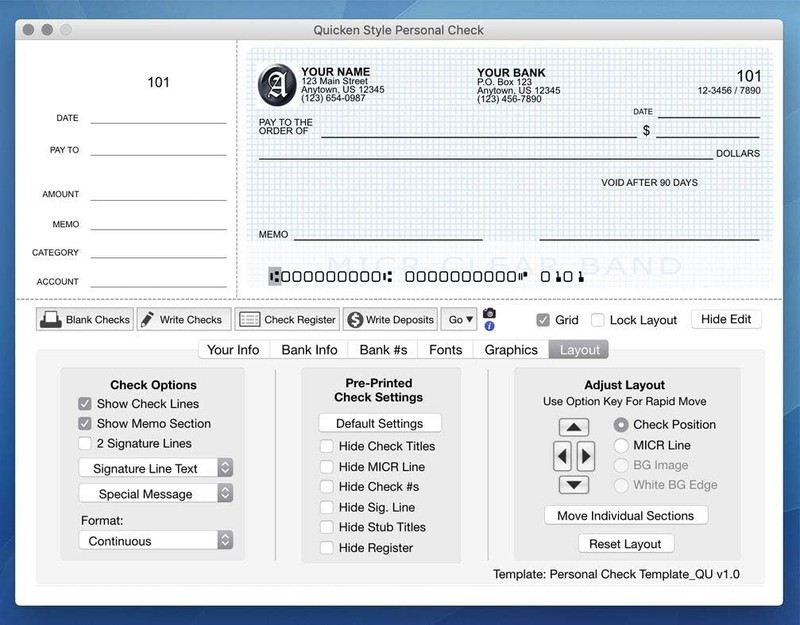
Windows & Mac Check Printing Software Use Windows PC (version 10 or newer) or Mac (version or newer, including Sonoma) Have as many accounts as you want - business & personal. Print blank or with payee, amount. Use pre-printed checks in some cases. (For banks only) Customize with logos, background, signature and fonts. Reconcile bank statement & print reports from register. NO ly subscription, NO printing fees Create ready to use checks on your Mac or Windows computer for personal or business use. Print completed checks with payee, amount, etc in 1 pass, or print blank checks ready to hand-filled or completed with your finance software (if it is so configured). Prints es, routing and account numbers. Memorize payee, amount, category and memo - to print completed checks with just a few clicks. Import any QIF, CSV or Tab file. Tracks transactions in a check register. Print reports, Reconcile bank statement. Export to QIF, CSV or Tab files. Print on pre-printed checks in some cases (must match one of our templates, be in sheet form , business checks perfed at ", wallet perfed at " - contact me for more info). Requirements: High quality printer; Bank compatible blank check paper; MICR ink or toner* FOR BANKS ONLY. For questions, feel free to contact me. Note: the program does not interface with other software, so completing with other finance software is a 2-step process. This is NOT a payroll program. Ships on a CD. Check paper not included. *Official bank recommendation. Many banks have optical readers that don't need magnetic ink, though some still have the older-style magnetic readers. Many don't use MICR toner with no problem. Your experience may vary.
Specifications
| Return Shipping Will Be Paid By | Seller |
| All Returns Accepted | Returns Accepted |
| Item Must Be Returned Within | 30 Days |
| Brand | Unbranded |
| Type | Details In Description |
| UPC | Does not apply |
| For Operating Systems | Windows |
Windows & Mac Check Printing Software Use Windows PC (version 10 or newer) or Mac (version or newer, including Sonoma) Have as many accounts as you want – business & personal. Print blank or with payee, amount. Use pre-printed checks in some cases. (For banks only) Customize with logos, background, signature and fonts. Reconcile bank statement & print reports from register. NO ly subscription, NO printing fees Create ready to use checks on your Mac or Windows computer for personal or business use. Print completed checks with payee, amount, etc in 1 pass, or print blank checks ready to hand-filled or completed with your finance software (if it is so configured). Prints es, routing and account numbers. Memorize payee, amount, category and memo – to print completed checks with just a few clicks. Import any QIF, CSV or Tab file. Tracks transactions in a check register. Print reports, Reconcile bank statement. Export to QIF, CSV or Tab files. Print on pre-printed checks in some cases (must match one of our templates, be in sheet form , business checks perfed at “, wallet perfed at ” – contact me for more info). Requirements: High quality printer; Bank compatible blank check paper; MICR ink or toner* FOR BANKS ONLY. For questions, feel free to contact me. Note: the program does not interface with other software, so completing with other finance software is a 2-step process. This is NOT a payroll program. Ships on a CD. Check paper not included. *Official bank recommendation. Many banks have optical readers that don’t need magnetic ink, though some still have the older-style magnetic readers. Many don’t use MICR toner with no problem. Your experience may vary.