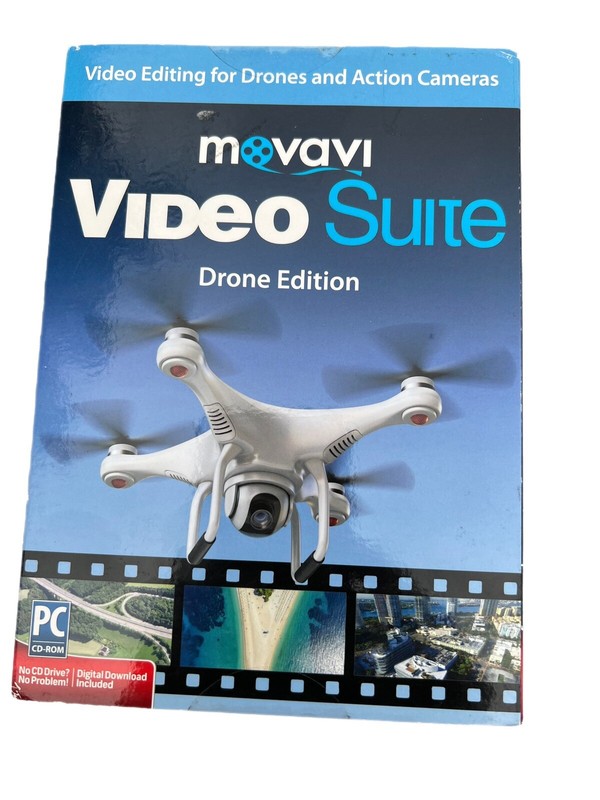

Movavi Video Suite Drone Edition: Video Editing Suite for Drone Camera
Movavi Video Suite Drone Edition: Video Editing Suite for Drone Camera. " 2017" Brand: Movavi Model: 8133262 " 2017 edition" Turn Your Drone Video Footage Into A Stunning Shareable Video! Movavi Video Suite Drone Edition is a comprehensive video making software used to create professional looking movies-even if you don't have experience. The complete tool set makes it easy to manage and edit your media file collection. Create films from your drone footage like a pro using the multi-track timeline and video montage tools. Split, join, crop and rotate video clips. Add a little Hollywood with special effects and creative transitions. Share your drone video masterpieces on Facebook, YouTube and other sites. Drone Edition Features: Edit your drone footage: Create great drone videos: stabilize your footage, correct the colors, do montage, and save the result. Split and join videos: Split and trim videos, cut unwanted parts, join several clips into one. Add special effects and transitions: Enjoy full-featured video editor with a great number of special effects, filters, and transitions. Create slideshows and your own movies: Make videos from pictures and video fragments, add music and titles. Capture video: Record screen, online video, capture webcam, TV-tuner, VHS output. Share files online: Upload your creations to YouTube, Facebook, and Amazon S3. Multilingual Interface: English, Dutch, French, German, Italian, Japanese, Polish, Portuguese, Russian, Spanish, Turkish. Video Editor App: Enhance your video files with two or three simple steps, or turn them into something completely new. Make your drone videos better: Improve video quality and remove defects to prepare video for sharing with your friends and uploading to social media sites. Apply creative effects and transitions: Use various filters and special effects: show multiple videos on one screen with the Split Screen and Picture in Picture effects, imitate the camera zoom, change the background with the Chroma Key effect, make your video look like an old-style movie, add beautiful flying objects to it, and more. Insert smooth transitions between scenes. Adjust video parameters: Fix brightness, contrast, and other characteristics of your video, adjust colors. Add Audio and Titles: Add some music to your movies or record your own narration to create a video with voiceover. Overlay titles and adjust parameters of the text. Manage multiple video or audio files on one timeline panel: All necessary tools are at your hand! Screen Capture app: Capture any type of screen activity and save it Capture screen: Record screencasts, online video, Flash animation from a website, a video chat with your family and friends, and other kinds of screen activity. Record narration: Record your commentary while capturing video to create screencasts with voiceover. Capture mouse and keyboard actions: Highlight the cursor, include mouse click sound in your recording. Record high quality video at a speed of up to 60 frames per second: Set the desired frame rate in the program settings. Adjust the capture area: Choose one of the ready-made capture frame size presets or adjust the capture frame manually. Set capture timer: Just tell the program when it should stop recording and take a break while it's working. Output File Formats and Codecs Supported MP4 (.mp4), MKV (.mkv), MOV (.mov), AVI (.avi), WMV (.wmv), Webm (.webm), H.264, MJPEG, VP8, VP9, AAC, MP3 MP3* (.mp3), AAC (.aac), FLAC (.flac), WAV (.wav), OGG (.ogg) * MP3 encoding starting from Win 8 BMP (.bmp), JPEG (.jpg), JPEG (.jpeg, .jpg, .jp2, .jls), PNG (.png), TIFF (.tiff) Features · Easy to use, no experience necessary · Supports popular media formats as well as 4K Technology · Complete tool set to edit and improve drone footage · Eliminates the effects of camera shake with the help of the program stabilization
Specifications
| Return Shipping Will Be Paid By | Seller |
| All Returns Accepted | Returns Accepted |
| Item Must Be Returned Within | 30 Days |
| Refund Will Be Given As | Money Back |
| Brand | Movavi |
| Type | Video Editing |
| Platform | Windows |
| Language | English |
| Minimum RAM | 2 GB |
| MPN | 42780-0-Card |
| For Operating Systems | Windows |
Movavi Video Suite Drone Edition: Video Editing Suite for Drone Camera. ” 2017″ Brand: Movavi Model: 8133262 ” 2017 edition” Turn Your Drone Video Footage Into A Stunning Shareable Video! Movavi Video Suite Drone Edition is a comprehensive video making software used to create professional looking movies-even if you don’t have experience. The complete tool set makes it easy to manage and edit your media file collection. Create films from your drone footage like a pro using the multi-track timeline and video montage tools. Split, join, crop and rotate video clips. Add a little Hollywood with special effects and creative transitions. Share your drone video masterpieces on Facebook, YouTube and other sites. Drone Edition Features: Edit your drone footage: Create great drone videos: stabilize your footage, correct the colors, do montage, and save the result. Split and join videos: Split and trim videos, cut unwanted parts, join several clips into one. Add special effects and transitions: Enjoy full-featured video editor with a great number of special effects, filters, and transitions. Create slideshows and your own movies: Make videos from pictures and video fragments, add music and titles. Capture video: Record screen, online video, capture webcam, TV-tuner, VHS output. Share files online: Upload your creations to YouTube, Facebook, and Amazon S3. Multilingual Interface: English, Dutch, French, German, Italian, Japanese, Polish, Portuguese, Russian, Spanish, Turkish. Video Editor App: Enhance your video files with two or three simple steps, or turn them into something completely new. Make your drone videos better: Improve video quality and remove defects to prepare video for sharing with your friends and uploading to social media sites. Apply creative effects and transitions: Use various filters and special effects: show multiple videos on one screen with the Split Screen and Picture in Picture effects, imitate the camera zoom, change the background with the Chroma Key effect, make your video look like an old-style movie, add beautiful flying objects to it, and more. Insert smooth transitions between scenes. Adjust video parameters: Fix brightness, contrast, and other characteristics of your video, adjust colors. Add Audio and Titles: Add some music to your movies or record your own narration to create a video with voiceover. Overlay titles and adjust parameters of the text. Manage multiple video or audio files on one timeline panel: All necessary tools are at your hand! Screen Capture app: Capture any type of screen activity and save it Capture screen: Record screencasts, online video, Flash animation from a website, a video chat with your family and friends, and other kinds of screen activity. Record narration: Record your commentary while capturing video to create screencasts with voiceover. Capture mouse and keyboard actions: Highlight the cursor, include mouse click sound in your recording. Record high quality video at a speed of up to 60 frames per second: Set the desired frame rate in the program settings. Adjust the capture area: Choose one of the ready-made capture frame size presets or adjust the capture frame manually. Set capture timer: Just tell the program when it should stop recording and take a break while it’s working. Output File Formats and Codecs Supported MP4 (.mp4), MKV (.mkv), MOV (.mov), AVI (.avi), WMV (.wmv), Webm (.webm), H.264, MJPEG, VP8, VP9, AAC, MP3 MP3* (.mp3), AAC (.aac), FLAC (.flac), WAV (.wav), OGG (.ogg) * MP3 encoding starting from Win 8 BMP (.bmp), JPEG (.jpg), JPEG (.jpeg, .jpg, .jp2, .jls), PNG (.png), TIFF (.tiff) Features · Easy to use, no experience necessary · Supports popular media formats as well as 4K Technology · Complete tool set to edit and improve drone footage · Eliminates the effects of camera shake with the help of the program stabilization