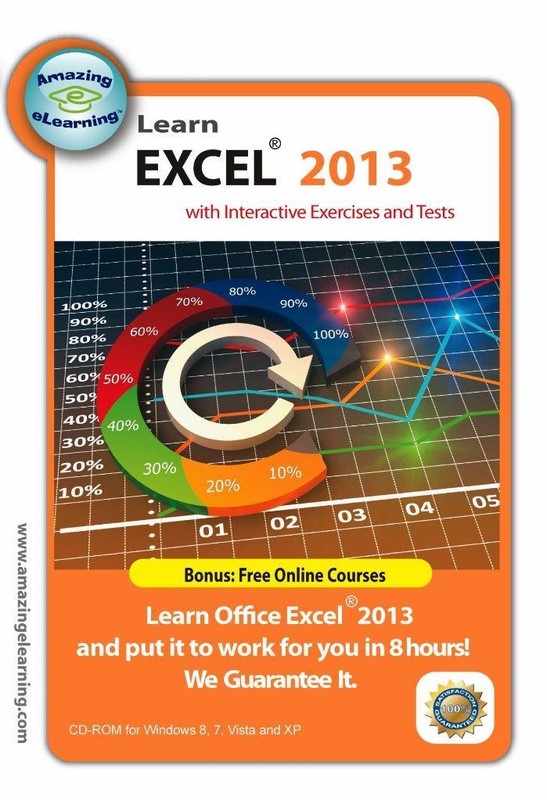
Learn Microsoft Office Excel 2013 Interactive Training DVD Course
Learn Microsoft Excel 2013 fast with our proven step-by-step interactive training DVD. Bonus: Windows 7 and vista training CD included. Learn Microsoft Office Excel 2013 spreadsheet program in a few hours Learn Microsoft Office Excel 2013 spreadsheet program in a few hours Click image to enlarge Description Interactive Computer-based Self Study DVD Training Course for Microsoft Excel 2013 Note: Excel 2013 is trademark of Microsoft . This is only for training purpose. You need to purchase the Microsoft 365 software separately. Features: Get to know the new interface of Excel 2013, Windows 7 and Vista immediately Learn how to use Excel 2013 so that you can create spreadsheet with formula, graph, chart and much more. Lessons include captions, voice and mouse interaction to accommodate the three basic learning styles: Reading, Hearing and Doing. The best step-by-step self-paced tutorial using the latest elearning solution. No Prior experience of using Excel nor spreadsheet is necessary. Absolute great for beginners and reference for advanced users. Exclusive Training Features: Interactive mode to enhance your learning experience Practice with Interactive exercise Take the assessment test to reassure what you have learned Use Keyboard short-cut to save time Excel 2013 Course Outline: Lesson 1: Getting started with Excel 2013 Introduction to Excel spreadsheet The interface of Excel 2013 Customizing the Quick Access toolbar Understanding the status bar Using Zoom-in and Mini Toolbar Using simple keyboard keys to move around Lesson 2: Basic Operation Creating and Converting Workbooks Understanding Type of Data Entering Data using Enter and Tab Performing basic operations: edit, move, copy and delete Entering Data using AutoFill Using Flash Fill and adding comments to the cell Lesson 3: Formatting Sheets, Cells and Tables Changing Font Settings of a Cell Applying Number Formats Adjusting row height and column width Hiding/unhiding rows and columns Applying Borders, Shading and Gradient Fill Using cell formatting Using Table Formatting Lesson 4: Formulas and Functions Using Formulas Entering Formulas Using Sum Formulas Using Sum, Average and SumIF Function Using Vlookup Function Lesson 5: Editing Graphics Inserting pictures Editing pictures Using SmartArt Inserting shapes Overlapping, grouping,& hiding graphics Capturing a Screenshot Lesson 6: Chart Design Inserting Charts Adding Chart Elements Changing Source Data Changing Chart Layout and Format Formatting Chart Elements Enhancing a chart Creating Sparklines Lesson 7: Managing Data Lists and Pivot Table Report Creating and Filtering a Data List Using Sort & Filter Using Subtotal Creating PivotTable Report Lesson 8: Automating Tasks with Macros Installing Developer Tab Recording Macro Editing Macro Macro Security Lesson 9: Helpful Keyboard shortcuts and hints Creating Excel Spreadsheet/chart in Word and PowerPoint Using Keyboard Shortcuts Helpful Hints Content: DVD-ROM disc (sealed in a DVD-case) Course Length: Over 20 hours of comprehensive Training Videos System Requirements: Platform: Windows 10, 8, 7 and Vista Processor: Pentium 133 Mhz or higher RAM: 32MB Hard drive space: 10MB CD-ROM Drive speed: 24 Get images that make Supersized seem small.Showcase your items with Auctiva's Listing Templates! THE simple solution for eBay sellers. Track Page Views With Auctiva's FREE Counter
Specifications
| Return Shipping Will Be Paid By | Buyer |
| All Returns Accepted | Returns Accepted |
| Item Must Be Returned Within | 30 Days |
| Format | DVD |
| For Operating Systems | Windows |
| Language | English |
| Brand | Microsoft |
Learn Microsoft Excel 2013 fast with our proven step-by-step interactive training DVD. Bonus: Windows 7 and vista training CD included. Learn Microsoft Office Excel 2013 spreadsheet program in a few hours Learn Microsoft Office Excel 2013 spreadsheet program in a few hours Click image to enlarge Description Interactive Computer-based Self Study DVD Training Course for Microsoft Excel 2013 Note: Excel 2013 is trademark of Microsoft . This is only for training purpose. You need to purchase the Microsoft 365 software separately. Features: Get to know the new interface of Excel 2013, Windows 7 and Vista immediately Learn how to use Excel 2013 so that you can create spreadsheet with formula, graph, chart and much more. Lessons include captions, voice and mouse interaction to accommodate the three basic learning styles: Reading, Hearing and Doing. The best step-by-step self-paced tutorial using the latest elearning solution. No Prior experience of using Excel nor spreadsheet is necessary. Absolute great for beginners and reference for advanced users. Exclusive Training Features: Interactive mode to enhance your learning experience Practice with Interactive exercise Take the assessment test to reassure what you have learned Use Keyboard short-cut to save time Excel 2013 Course Outline: Lesson 1: Getting started with Excel 2013 Introduction to Excel spreadsheet The interface of Excel 2013 Customizing the Quick Access toolbar Understanding the status bar Using Zoom-in and Mini Toolbar Using simple keyboard keys to move around Lesson 2: Basic Operation Creating and Converting Workbooks Understanding Type of Data Entering Data using Enter and Tab Performing basic operations: edit, move, copy and delete Entering Data using AutoFill Using Flash Fill and adding comments to the cell Lesson 3: Formatting Sheets, Cells and Tables Changing Font Settings of a Cell Applying Number Formats Adjusting row height and column width Hiding/unhiding rows and columns Applying Borders, Shading and Gradient Fill Using cell formatting Using Table Formatting Lesson 4: Formulas and Functions Using Formulas Entering Formulas Using Sum Formulas Using Sum, Average and SumIF Function Using Vlookup Function Lesson 5: Editing Graphics Inserting pictures Editing pictures Using SmartArt Inserting shapes Overlapping, grouping,& hiding graphics Capturing a Screenshot Lesson 6: Chart Design Inserting Charts Adding Chart Elements Changing Source Data Changing Chart Layout and Format Formatting Chart Elements Enhancing a chart Creating Sparklines Lesson 7: Managing Data Lists and Pivot Table Report Creating and Filtering a Data List Using Sort & Filter Using Subtotal Creating PivotTable Report Lesson 8: Automating Tasks with Macros Installing Developer Tab Recording Macro Editing Macro Macro Security Lesson 9: Helpful Keyboard shortcuts and hints Creating Excel Spreadsheet/chart in Word and PowerPoint Using Keyboard Shortcuts Helpful Hints Content: DVD-ROM disc (sealed in a DVD-case) Course Length: Over 20 hours of comprehensive Training Videos System Requirements: Platform: Windows 10, 8, 7 and Vista Processor: Pentium 133 Mhz or higher RAM: 32MB Hard drive space: 10MB CD-ROM Drive speed: 24 Get images that make Supersized seem small.Showcase your items with Auctiva’s Listing Templates! THE simple solution for eBay sellers. Track Page Views With Auctiva’s FREE Counter