Learn Microsoft Office 2013 - DVD Training Courses
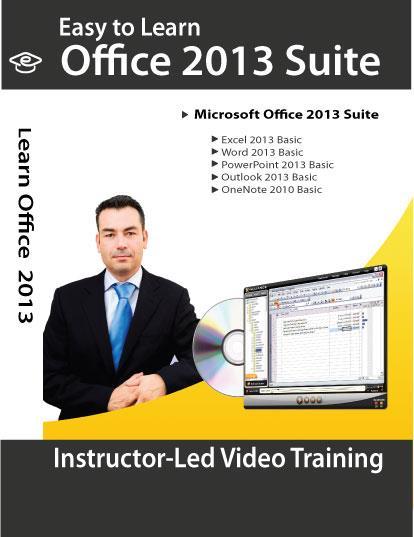
Become a master of the new version of Microsoft Office 365 program when taking our Microsoft Office training course. Not only will you learn all the new features and enhancements, but our self-study Office training videos are taught by certified instructors in the field that have years of experience in the corporate training world. With our Microsoft training course, you will learn from a variety of interactive components that make learning fun while still informative. Busy professionals don’t have to take time off of work or miss out on family time when learning from our self-study Office 2013 training videos either. This DVD course is easy to use and do not require Internet access. So you can learn at anytime and anytime, You can always go back to learn as many as times you can without any monthly fee nor registration fee. Learn Microsoft Office 2013 - DVD Training Courses Learn Microsoft Office 2013 - DVD Training Courses Click image to enlarge Description Total of Five Training Courses: 1. Excel 2013 Essential 2. Word 2013 Essential 3. PowerPoint 2013 Essential 4. Outlook 2013 Essential 5. OneNote 2010 Essential Amazing eLearning presents premium self-study video traingin course for Microsoft Office 365 and Office 2013 professional suite. These self-study lessons are in a format that lets you see the steps in the order they will be performed. Seeing the software in action and hearing instructors narrate each step is far more effice than reading a "How to" book. Textbooks and study guides with boring texts and limited images that make learning difficulty can't compet with the DVD training provided by these courses. You will learn how to work with Office suite 2013 and become a familiar with the Ribbon interface and other new features in lessons which include full motion video. Our certified instructors show you exactly how to use each program and clearly explain each step in an engaging manner without robotic voices or monotones. You get the benifits of one-on-one instruction and instructor-based learning at whatever location and time you choose at a fraction of the cost of the classroom lessons. Course Outline: Microsoft Excel 2013 Basic Level 1.0 Learning Basic Excel Elements 2.0 Applying Selection and Viewing Techniques 3.0 Utilizing Data Entry and Editing Techniques 4.0 Working with Excel Data 5.0 Formatting an Excel Worksheet 6.0 Performing Calculations Microsoft Word 2013 Basic Level 1.0 Basic Word Elements 2.0 Basic Word Details 3.0 Editing Texts 4.0 Preparing to Print and Printing 5.0 Formatting Text 6.0 Formatting Paragraphs 7.0 Working with Pages Microsoft PowerPoint 2013 Basic Level 1.0 Starting with PowerPoint Basic 2.0 Getting Comfortable with OneDrive 3.0 Creating Basic Presentations 4.0 Modifying Text 5.0 Working with Views 6.0 Adding Objects to Slides 7.0 Arranging Shapes Microsoft Outlook 2013 Basic Level 1.0 Starting with Outlook 2013 2.0 Exploring Messages 3.0 Accessing Email Features 4.0 Organizing Messages 5.0 Creating and Finding People (contacts) 6.0 Managing a Calendar 7.0 Using Tasks Microsoft OnNote 2010 Basic Level 1.0 Starting with OneNote 2.0 Working with Notes 3.0 Tranforming Items 4.0 Adding Elements 5.0 Using Drawing Tools 6.0 Using Formats Content: DVD-ROM disc (sealed in a DVD-case) Course Length: Over 40 hours of comprehensive Training Videos System Requirements: Platform: Windows 10, 8, 7 and Vista Processor: Pentium 133 Mhz or higher RAM: 32MB Hard drive space: 10MB CD-ROM Drive speed: 24 Pictures sell! Auctiva offers Free Image Hosting and Editing.300+ Listing Templates! Auctiva gets you noticed! The complete eBay Selling Solution. Track Page Views With Auctiva's FREE Counter
Specifications
| Return Shipping Will Be Paid By | Buyer |
| All Returns Accepted | Returns Accepted |
| Item Must Be Returned Within | 30 Days |
| Format | DVD |
| For Operating Systems | Windows |
| Language | English |
| Brand | Microsoft |
Become a master of the new version of Microsoft Office 365 program when taking our Microsoft Office training course. Not only will you learn all the new features and enhancements, but our self-study Office training videos are taught by certified instructors in the field that have years of experience in the corporate training world. With our Microsoft training course, you will learn from a variety of interactive components that make learning fun while still informative. Busy professionals don’t have to take time off of work or miss out on family time when learning from our self-study Office 2013 training videos either. This DVD course is easy to use and do not require Internet access. So you can learn at anytime and anytime, You can always go back to learn as many as times you can without any monthly fee nor registration fee. Learn Microsoft Office 2013 – DVD Training Courses Learn Microsoft Office 2013 – DVD Training Courses Click image to enlarge Description Total of Five Training Courses: 1. Excel 2013 Essential 2. Word 2013 Essential 3. PowerPoint 2013 Essential 4. Outlook 2013 Essential 5. OneNote 2010 Essential Amazing eLearning presents premium self-study video traingin course for Microsoft Office 365 and Office 2013 professional suite. These self-study lessons are in a format that lets you see the steps in the order they will be performed. Seeing the software in action and hearing instructors narrate each step is far more effice than reading a “How to” book. Textbooks and study guides with boring texts and limited images that make learning difficulty can’t compet with the DVD training provided by these courses. You will learn how to work with Office suite 2013 and become a familiar with the Ribbon interface and other new features in lessons which include full motion video. Our certified instructors show you exactly how to use each program and clearly explain each step in an engaging manner without robotic voices or monotones. You get the benifits of one-on-one instruction and instructor-based learning at whatever location and time you choose at a fraction of the cost of the classroom lessons. Course Outline: Microsoft Excel 2013 Basic Level 1.0 Learning Basic Excel Elements 2.0 Applying Selection and Viewing Techniques 3.0 Utilizing Data Entry and Editing Techniques 4.0 Working with Excel Data 5.0 Formatting an Excel Worksheet 6.0 Performing Calculations Microsoft Word 2013 Basic Level 1.0 Basic Word Elements 2.0 Basic Word Details 3.0 Editing Texts 4.0 Preparing to Print and Printing 5.0 Formatting Text 6.0 Formatting Paragraphs 7.0 Working with Pages Microsoft PowerPoint 2013 Basic Level 1.0 Starting with PowerPoint Basic 2.0 Getting Comfortable with OneDrive 3.0 Creating Basic Presentations 4.0 Modifying Text 5.0 Working with Views 6.0 Adding Objects to Slides 7.0 Arranging Shapes Microsoft Outlook 2013 Basic Level 1.0 Starting with Outlook 2013 2.0 Exploring Messages 3.0 Accessing Email Features 4.0 Organizing Messages 5.0 Creating and Finding People (contacts) 6.0 Managing a Calendar 7.0 Using Tasks Microsoft OnNote 2010 Basic Level 1.0 Starting with OneNote 2.0 Working with Notes 3.0 Tranforming Items 4.0 Adding Elements 5.0 Using Drawing Tools 6.0 Using Formats Content: DVD-ROM disc (sealed in a DVD-case) Course Length: Over 40 hours of comprehensive Training Videos System Requirements: Platform: Windows 10, 8, 7 and Vista Processor: Pentium 133 Mhz or higher RAM: 32MB Hard drive space: 10MB CD-ROM Drive speed: 24 Pictures sell! Auctiva offers Free Image Hosting and Editing.300+ Listing Templates! Auctiva gets you noticed! The complete eBay Selling Solution. Track Page Views With Auctiva’s FREE Counter
![New 2020 H&R Block Tax Software Basic Edition for PC/MAC [Key Card]](/images/qPwAAeSwukVpTaKr/New-2020-H-R-Block-Tax-Software-Basic-Ed.webp)