Movavi Photo Editor Easy Photo Editing , Photo Effects , BMP GIF JPEG for MAC
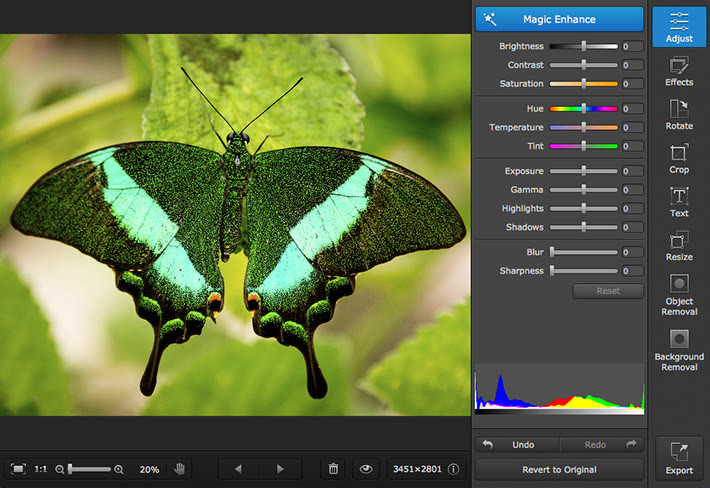
Movavi Photo Editor for Mac If you’re wondering how to edit photos on your Mac without the hassle of other programs, give this neat little app a try. The clear and simple interface, automatic quality improvements, and smart selection options make photo processing fun! Experiment with backgrounds, delete skin imperfections and unwanted objects, apply filters and textures, tweak parameters using color-coded sliders, straighten, crop and flip frames. Need more disc space on your Macintosh? Scale photos down to reduce their file size. Supported Formats Input Output BMP, DPX, EXR, GIF (not animated), JJPEG, JPEG-LS, JPEG 2000, PBM, PAM, PGM, PCX, PIC, PGMYUV, PNG, PIX, PTX, PPM, Sun Rasterfile, TIFF, TARGA, WebP, XFace, XBM, XWD BMP, DPX, JPEG, PCX, PBM, PNG, PGM, PPM, TIFF, TGA, XBM System Requirements Intel-based Mac computer Mac OS X 10.6, 10.7, 10.8, 10.9, 10.10 Display resolution of 800x600, 32-bit color 128 MB RAM Minimum 150 MB free hard disk space for installation, 1 GB for ongoing operationsAdministrator permissions for installation
Specifications
| All Returns Accepted | ReturnsNotAccepted |
| For Operating Systems | Mac |
| Model | Movavi MAC |
| Brand | Movavi |
| Platform | Windows |
| Language | English |
| License Category | Business-to-Consumer |
| Country/Region Of Manufacture | United States |
| Operating Systems | Apple Mac OS X |
Movavi Photo Editor for Mac If you’re wondering how to edit photos on your Mac without the hassle of other programs, give this neat little app a try. The clear and simple interface, automatic quality improvements, and smart selection options make photo processing fun! Experiment with backgrounds, delete skin imperfections and unwanted objects, apply filters and textures, tweak parameters using color-coded sliders, straighten, crop and flip frames. Need more disc space on your Macintosh? Scale photos down to reduce their file size. Supported Formats Input Output BMP, DPX, EXR, GIF (not animated), JJPEG, JPEG-LS, JPEG 2000, PBM, PAM, PGM, PCX, PIC, PGMYUV, PNG, PIX, PTX, PPM, Sun Rasterfile, TIFF, TARGA, WebP, XFace, XBM, XWD BMP, DPX, JPEG, PCX, PBM, PNG, PGM, PPM, TIFF, TGA, XBM System Requirements Intel-based Mac computer Mac OS X 10.6, 10.7, 10.8, 10.9, 10.10 Display resolution of 800×600, 32-bit color 128 MB RAM Minimum 150 MB free hard disk space for installation, 1 GB for ongoing operationsAdministrator permissions for installation